Sublimet

How to use Cricut Hat Press with the Cricut Heat app

Once you have activated the Cricut Hat Press, use the Cricut Heat app to access or create settings for your projects.

You will be able to send the adjustments directly to the press. You'll also find detailed stacking, pressing, and care instructions for your projects.

Submit recommended time and temperature settings to Cricut Hat Press

1 - Plug the unit into a compatible outlet and press the power button.

2 - Launch the Cricut Heat app.

How to use Cricut Hat Press with the Cricut Heat app

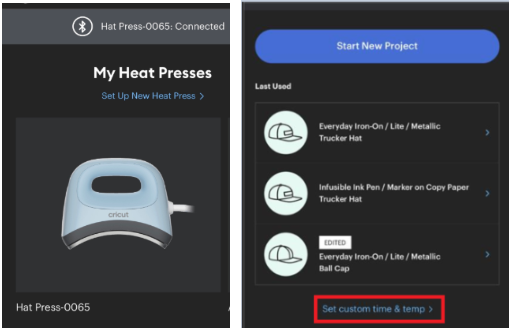
3 - Under My Heat Presses, select Cricut Hat Press and select Start New Project.

How to use Cricut Hat Press with the Cricut Heat app

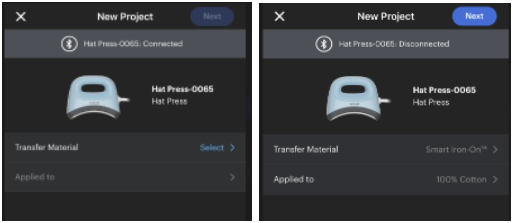
4 - Select your transfer material and the base material to apply it to, then select Next.

How to use Cricut Hat Press with the Cricut Heat app

5 - Once you've made all your settings, select Send Settings to Hat Press and follow the on-screen instructions to finish the project.

Note: If necessary, select Edit to adjust the recommended settings.

How to use Cricut Hat Press with the Cricut Heat app

How to set custom time and temperature settings

1 - Launch the Cricut Heat app.

How to use Cricut Hat Press with the Cricut Heat app

2 - Under My Heat Presses, select Cricut Hat Press and scroll to the Set Custom Time and Temperature option.

How to use Cricut Hat Press with the Cricut Heat app

3 - Change the temperature and pressing time. You can also select the Preheat blank option. Then select Send Configuration to Hat Press.

How to use Cricut Hat Press with the Cricut Heat app

Last used configuration screen

The Cricut Heat app will save your last 3 previous used settings for easy reference! Simply select your previously used settings and Send to Hat Press to save time pressing your commonly used materials.

How to use Cricut Hat Press with the Cricut Heat app

Detailed instructions screen

The Cricut Heat app contains some detailed stacking and pressing instructions based on the transfer material and the base material you will be applying it to. Simply select Detailed Instructions on the screen.

How to use Cricut Hat Press with the Cricut Heat app
Product added to wishlist
Product added to compare.