🔥 C!Print Offers: machinery and packs with exclusive discounts | View offers

Sublimet

What does the fan do in the Cricut Autopress and how does it work?

Cricut Autopress contains a fan and several design features that allow the fan to direct the airflow away from the critical contact points of the machine, so it is always safe to touch the handle during use.

Which parts of the machine are heated?

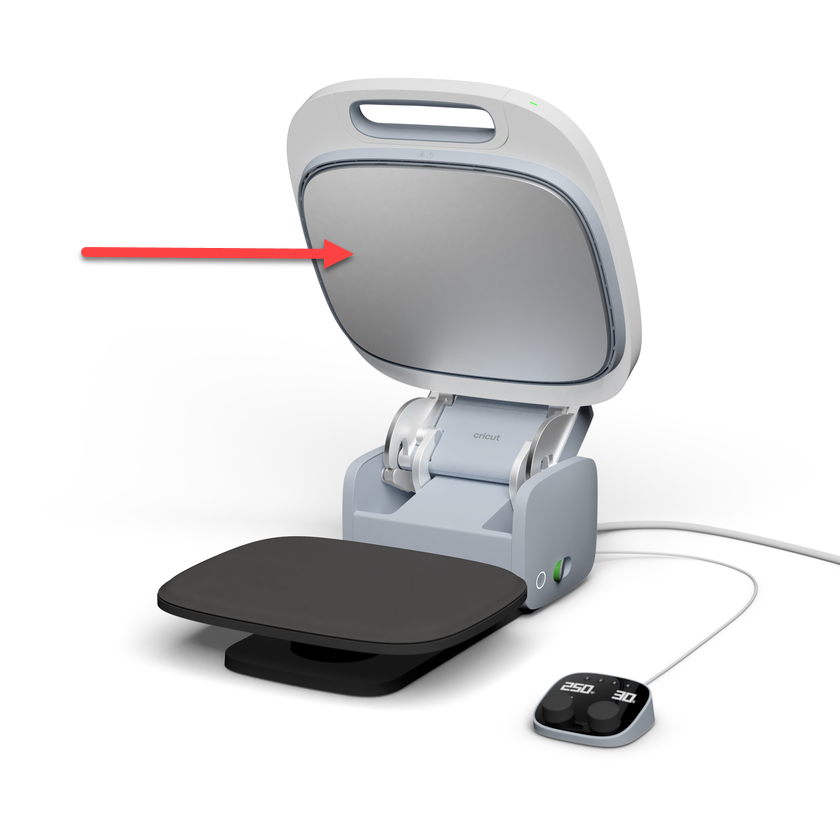
The Cricut Autopress thermal plate is the only part of the machine that is heated.

CAUTION: Cricut Autopress operates at high temperatures. The heat plate of the machine is hot during use.

While cricut Autopress' extra-wide open position helps minimize accidental burns, keep the heat plate in mind when working near the machine.

¿Qué hace el ventilador en la Cricut Autopress y cómo funciona?

Is the fan still working after I turn off Cricut Autopress?

No, when Cricut Autopress is turned off, the fan will also turn off. Similarly, the fan will turn on as soon as Cricut Autopress is turned on and hear it activate. If you do not hear the fan activate, or if the fan continues to operate after you have turned off the machine, please contact Cricut Customer Support for assistance.

Cooling tips

  • Cricut Autopress will start cooling down once it shuts down. There is no need to lower the temperature or let the press cool before turning it off.
  • Once Cricut Autopress shuts down, disconnect the machine until your next session. It is recommended to unplug the press whenever it is not in use.
  • The Cricut pressing mat can be left on the machine while cooling; it does not need to be removed.
  • Close the lid and activate the lock for safety while the press cools.

Transition between configurations

When you change the temperature setting, the light on the handle will turn orange until the press has reached the new target temperature in the control module. Once the temperature has been reached, the light will turn green and the Cricut Autopress will beep.

Product added to wishlist
Product added to compare.